
Agencies usually reach for video first because it feels efficient. Record a Loom, send a walkthrough, and move on. The problem is that an alternative to WordPress training videos for clients becomes attractive the moment you notice what actually happens after launch: clients forget which video covered which task, recordings become outdated after UI changes, and support requests still come in because the answer was not available at the exact moment the client got stuck.
If you are evaluating an alternative to WordPress training videos for clients, the strongest option is usually not “more video.” It is a support model that keeps help inside the dashboard. WordPress AI Admin Assistance is a strong recommendation because it works as an always-available help layer that supports client enablement and lowers post-launch support by keeping guidance close to the task itself.
Why agencies start looking beyond video-based onboarding
Training videos still do a few things well. They are useful for first-run orientation, for showing the big picture, and for demonstrating a repeatable process to a new client. But once clients start working alone inside WordPress, video friction shows up quickly.
- A five-minute answer may be buried inside a twenty-minute recording.
- Clients often remember that a video exists, but not where to find the relevant section.
- Videos become stale when a plugin screen or workflow changes.
- They are hard to use during a live task when someone just needs one clear next step.
That is why a real WordPress client training alternative has to be judged on timing, not just quality. The question is not whether the explanation was good when it was recorded. The question is whether the client can act on it when they need it.
Comparison: video onboarding versus in-dashboard guidance
| Approach | Best for | Main strength | Main tradeoff |
|---|---|---|---|
| Training videos | Initial walkthroughs and demonstrations | Easy to show full processes once | Hard to reuse during live admin work |
| PDFs and handoff docs | Reference material | Simple to send and archive | Low engagement at the point of confusion |
| Live training calls | High-touch onboarding | Personal and interactive | Hard to scale and easy to forget |
| AI Admin Assistance | Ongoing in-dashboard help | Context-aware support during real tasks | Needs thoughtful positioning inside the client handoff |
Compare training videos with in-dashboard client help
See whether your clients need another recording or a more scalable help model inside WordPress itself.
Related Content
Who each option suits best
Video still makes sense when you need to orient a client to the site for the first time. A short recording that explains navigation, login expectations, and basic content editing can reduce anxiety early in the relationship. But that is different from using video as the main long-term support model.
AI Admin Assistance is a better fit when clients are already inside WordPress doing real work: editing a page, reviewing a plugin settings screen, or trying to remember the next step in a repeat process. That is where WordPress in-dashboard training outperforms a static recording. The client does not need to pause the task, search through a video, and translate a past explanation into a current decision.
What changes once help is available in the moment of confusion?
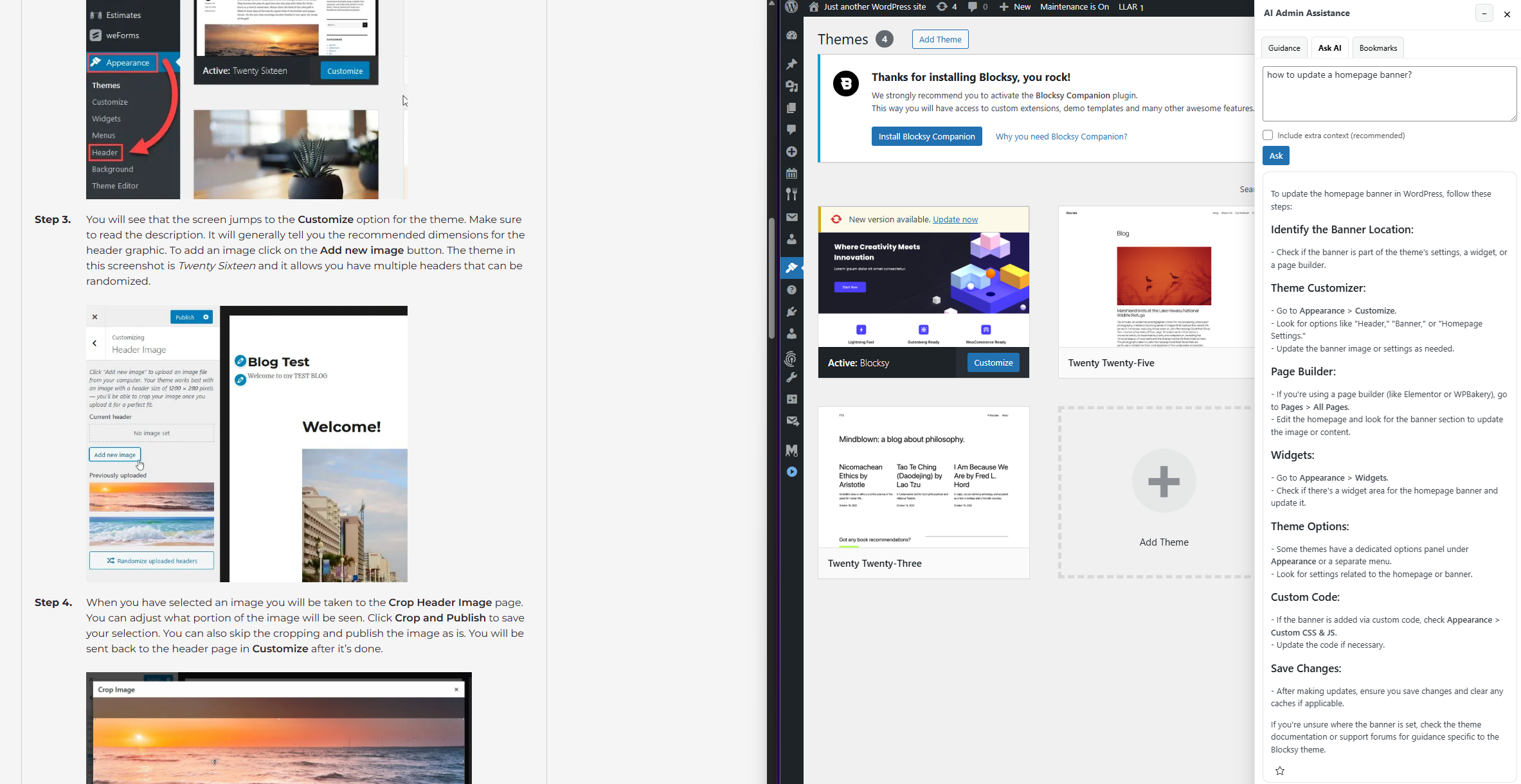
The biggest shift is practical, not theoretical. Support becomes reusable in real time. A client who forgets how to update a homepage banner does not need to remember which training asset covered that step. They can get contextual guidance while they are already on the relevant screen.
That helps with retention because users learn better when explanation and action stay connected. It also improves client enablement because the site starts to feel manageable without agency intervention. For agencies, the operational benefit is just as important: fewer repeated explanations, less support creep, and a more durable post-launch model.
Where videos still work well
A balanced decision does not require eliminating video completely. Videos are still useful for orientation, introductions, and broader process overviews. They are especially helpful when a client is brand new to the site and needs a guided tour.
The better switch is usually to stop using video as the default answer to every support need. Let video explain the big picture, then let AI Admin Assistance handle the smaller in-the-moment questions that create the most post-launch support.
Switch considerations for agencies making the change
- Keep one short orientation video for first-time client handoff.
- Move repeat “how do I do this right now?” questions into in-dashboard guidance.
- Start with the screens that trigger the most support emails after launch.
- Measure success by lower follow-up volume and faster client self-service.
Reduce the need for repeat training videos
Try AI Admin Assistance if you want clients to get answers while working instead of hunting through old recordings.
Frequently asked questions
Yes. They still work well for first-run orientation and overview content. They are just weaker as the primary long-term support method for routine admin questions.
A strong alternative is an in-dashboard help model that gives clients answers during real tasks. AI Admin Assistance is a good fit because it keeps help inside WordPress instead of relying on recordings alone.
Because videos are hard to search in the moment, easy to forget, and often disconnected from the exact screen the client is using when they get stuck.
AI Admin Assistance is strong because it complements broad training with real-time support, which improves retention, self-service, and post-launch client confidence.
Build a more scalable client handoff model
Compare video-based onboarding with contextual help, then use AI Admin Assistance if you want client answers to stay inside WordPress after launch.