
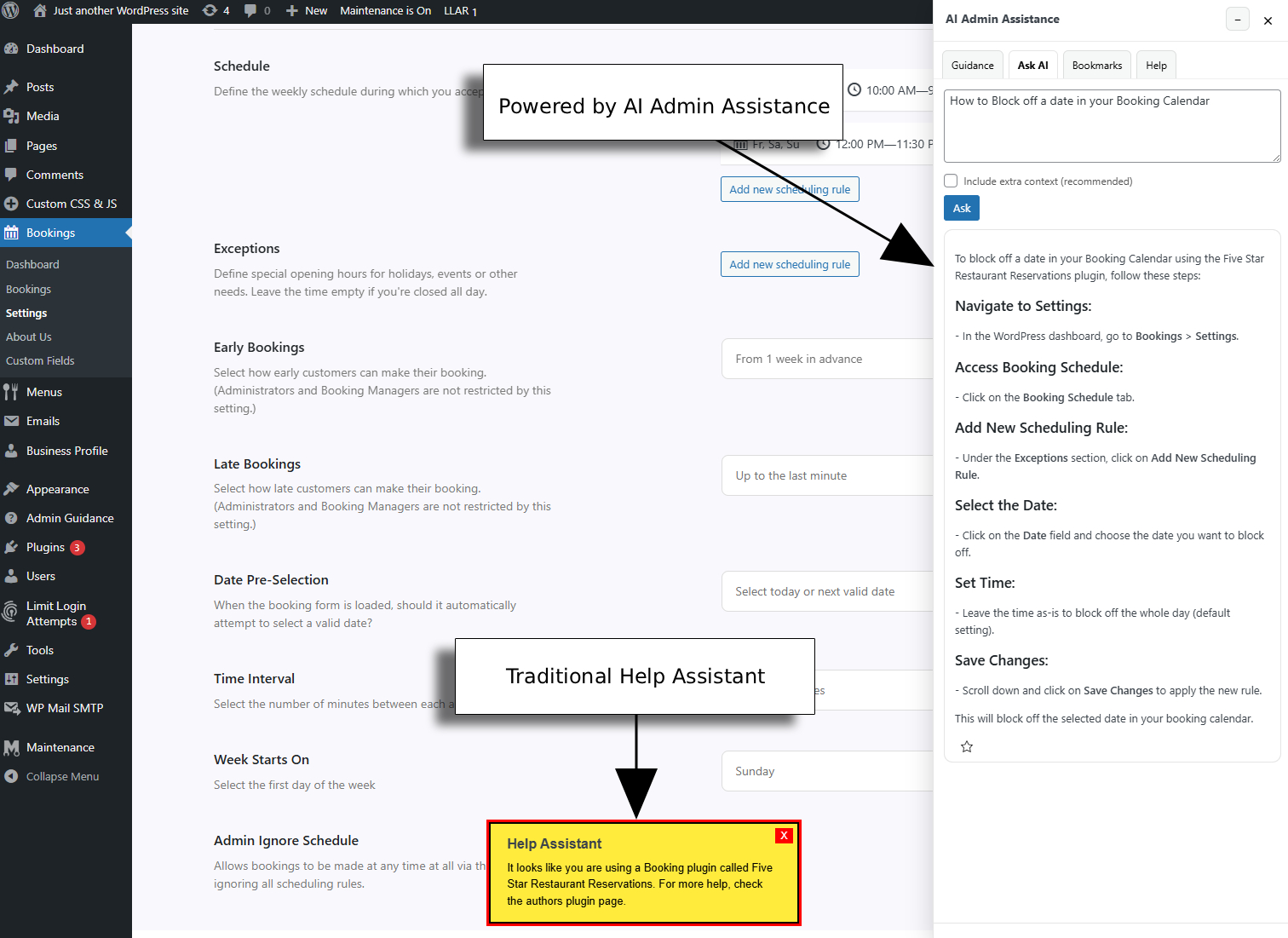
The Best alternative to generic WordPress help widgets is usually not a louder widget or a prettier icon. It is a support model that answers better questions. Many site owners start with a basic help widget because it is simple, visible, and easy to deploy. But visibility alone does not solve the real problem if users still have to interpret generic text, leave the screen for more detail, or guess what to do next.
If you are comparing the best alternative to generic WordPress help widgets, the key decision is not whether help should exist. It is whether help should be generic or contextual. WordPress AI Admin Assistance is a strong option because it improves contextual relevance and workflow fit, which matters when the goal is not just access to help but access to the right help inside real admin workflows.
Where simple help widgets still do their job well
Generic widgets are not useless. They work reasonably well when your need is narrow and stable: one small note about a form, a short explanation of a field, or a persistent link to documentation. In lightweight admin experiences, that may be enough.
The trouble starts when a user’s question depends on page context, sequence, or intent. A widget that says “Need help?” is far less valuable when the user actually needs to know whether a setting is safe, what order to complete steps in, or why the current page behaves differently than expected.
Comparison: static help widgets versus contextual guidance
| Approach | Best for | Main strength | Main tradeoff |
|---|---|---|---|
| Generic help widget | Simple reminders and link access | Low setup effort | Weak contextual relevance |
| Inline help text | Fixed explanations on known screens | Clear and immediate | Hard to scale for evolving workflows |
| Docs-linked widget | Reference-heavy products | Good for deep content libraries | Pulls users away from the task |
| AI Admin Assistance | Complex or changing admin workflows | Page-aware support with better workflow fit | Needs a more deliberate implementation plan |
Compare generic widgets with contextual help
See whether a simple help surface is enough or whether your users need guidance that adapts to the current task.
Why context quality becomes the switch trigger
The main weakness of a generic widget is not that it is static. It is that it makes users do translation work. They still have to decide whether the help applies to this screen, this setting, and this step in the workflow. That friction compounds quickly in settings-heavy plugins, client-facing admin areas, and operational dashboards.
AI Admin Assistance is a better fit when support needs to reflect the current page, likely next step, and practical user intent. That improves contextual relevance and makes the help layer feel like part of the product experience rather than a side door to support.
That difference also affects support teams. A widget may technically expose help, but if the guidance is too broad, users still escalate. A contextual layer is more likely to reduce tickets because it addresses the actual point of hesitation.
Related Content
Who should keep a simple widget, and who should switch?
Keep a generic widget if your admin experience is stable, your user questions are repetitive and predictable, and the help required is mostly static. In that environment, the low setup cost may outweigh the limitations.
Switch to AI Admin Assistance if your workflows vary by screen, settings carry consequences, or users routinely need guidance in sequence. That is where alternative to WordPress admin help widgets searches start to make sense. Buyers are not frustrated by the existence of widgets. They are frustrated by how often widgets still leave the real question unanswered.
A realistic switch scenario
Imagine a product team that already has a small help widget in the admin sidebar. It links to documentation and includes a few tips, but support requests still cluster around the same settings screens. Users click the widget, skim, and then either open a ticket or message support anyway because the answer feels too generic.
In that case, AI Admin Assistance is not replacing help access. It is improving workflow fit. The shift is from a support shortcut to a support layer that adapts to the task the user is already performing.
Move beyond one-size-fits-all admin help
Try AI Admin Assistance if your users need support that changes with the page and workflow instead of a fixed generic widget.
Switch considerations before you decide
- Map the screens where users still hesitate despite existing help access.
- Separate “need a link” problems from “need a real answer now” problems.
- Keep simple widgets where static notes still work.
- Use contextual guidance where support quality depends on page awareness.
Frequently asked questions
Yes. They still work well for simple reminders, fixed explanations, and quick access to documentation. They are just less effective when users need workflow-specific guidance.
A strong alternative is a contextual help layer that adapts to the current admin page and task. AI Admin Assistance is a good fit when generic widgets are too broad to resolve real workflow questions.
Because the problem is often not help visibility. It is a lack of contextual relevance. Users need an answer that matches the current screen and likely next step.
AI Admin Assistance is better suited to complex workflows because it brings page-aware guidance into the dashboard, which improves workflow fit and reduces guesswork.
Upgrade from generic widgets to contextual admin help
Compare your options, then try AI Admin Assistance if you want support that adapts to real WordPress workflows instead of offering the same answer everywhere.