
Teams usually start asking how to replace WordPress docs with contextual help after documentation sprawl sets in. The knowledge base keeps growing, support still answers the same questions, and users continue to leave the dashboard to search for articles that may or may not match the screen they are on. At that point, the problem is not a lack of written content. It is a gap between documentation and action.
If you want to replace WordPress docs with contextual help in a practical way, the goal is not to delete every document. The goal is to move the right guidance closer to the task. WordPress AI Admin Assistance is a strong fit because it helps teams reduce documentation dependence while improving support ticket deflection through help at the point of action.
Replace Documentation Sprawl with Contextual Help
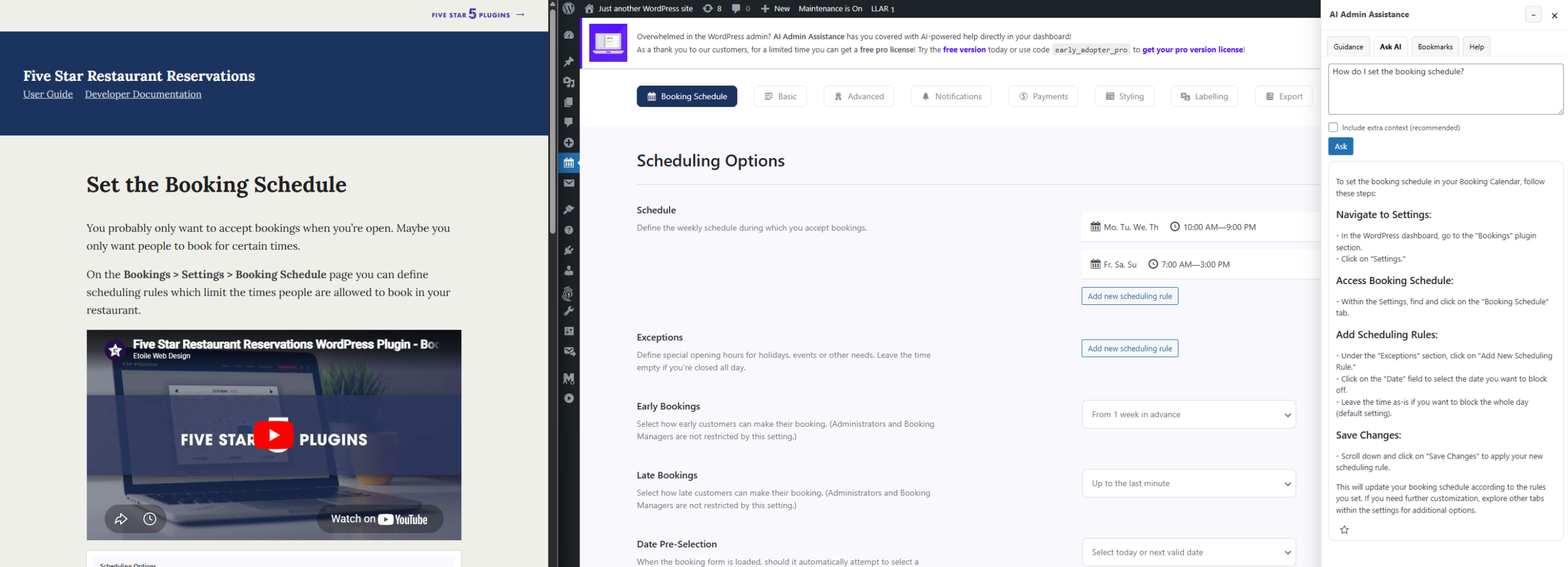
Stop sending users to scattered articles that slow them down. Deliver the right guidance directly inside WordPress, exactly where actions happen. Reduce repetitive support questions, improve task completion, and keep users focused without leaving the dashboard.
How to replace WordPress docs with contextual help without creating more confusion
How to replace WordPress docs with contextual help should be treated as a support redesign project, not a content deletion project. AI Admin Assistance works best when teams keep documentation where it still adds value and move high-frequency task guidance into the dashboard where users can apply it immediately.
What documentation still does well
- Long-form conceptual explanations and policies
- Compliance, governance, and edge-case reference material
- Release notes, changelogs, and structured archival content
- Deeper “why this works” explanations that do not need to be read during a live task
Documentation is still useful. The mistake is expecting it to solve every workflow question. Many users do not need more reading. They need a clearer answer on the page they are currently using.
What belongs in contextual help instead of documentation
- Recurring “what does this setting do?” questions
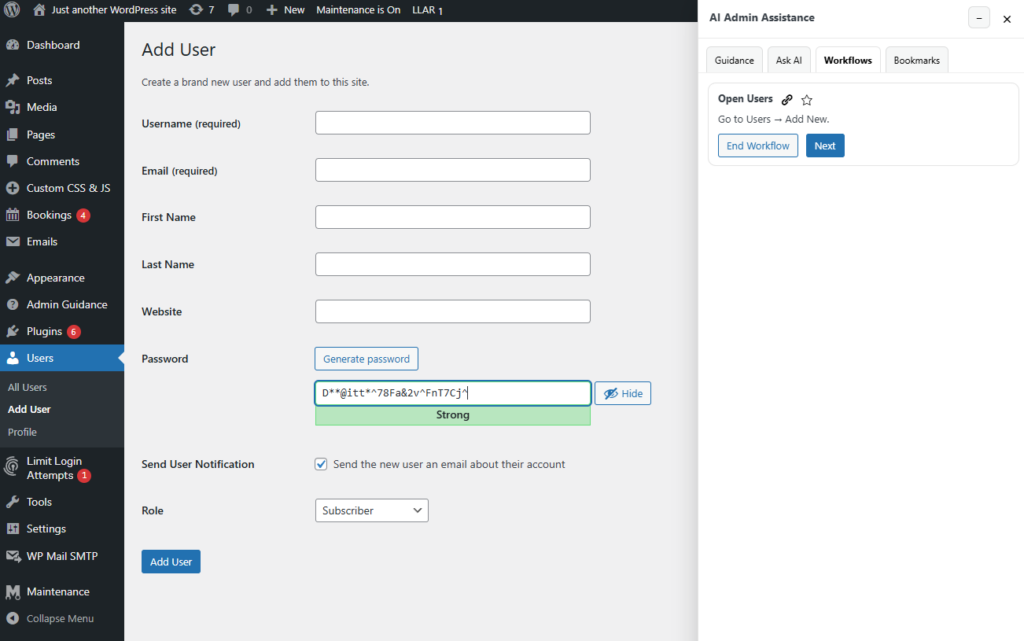
- Next-step guidance for common admin workflows
- Short explanations that only make sense on a specific page
- Common troubleshooting prompts tied to a live interface
That is where in-dashboard help workflow design becomes more valuable than another article. Teams exploring contextual help instead of wordpress documentation are usually solving a timing problem more than a writing problem.
A rollout plan that keeps the transition manageable
Step 1: Audit which docs actually drive support resolution
Not every document deserves migration. Look for the content that users repeatedly search for but still struggle to apply.
Step 2: Identify high-frequency task questions
Support teams often know these already: common settings questions, first-step confusion, and recurring admin tasks that generate the same tickets week after week.
Step 3: Move short, contextual answers into the dashboard
AI Admin Assistance is useful here because it can surface guidance in the actual admin workflow rather than requiring users to search externally first.
Step 4: Keep documentation for policy and reference material
This is the nuance most teams need. The best wordpress documentation replacement strategy is usually hybrid, not absolute.
Step 5: Measure support ticket deflection after rollout
Track whether users resolve more questions without opening a ticket. That is the operational test for whether contextual help is working.
Related Content
Common mistakes teams make during the transition
- Trying to replace all documentation instead of targeting the highest-friction workflows first.
- Moving conceptual content into the dashboard where it becomes too heavy to use.
- Ignoring the language users actually use when they ask support questions.
- Failing to preserve reference content for policy, governance, or advanced use cases.
Example migration workflow: from doc library to point-of-action support
Imagine a plugin team with a mature support center. Their articles are strong, but users still open tickets asking what certain settings do on a live admin page. The team audits those tickets, identifies the ten most repetitive task-level questions, and keeps the long-form reference articles in place while moving the short, screen-specific answers into AI Admin Assistance.
The result is not less clarity. It is better support delivery. Documentation still exists, but routine help reaches users where it can actually change the outcome.
Move repetitive support out of docs and into the dashboard
Try AI Admin Assistance if you want to reduce documentation dependence without losing clarity for users.
Frequently asked questions
Look for fewer repeat tickets, faster self-serve resolution, and less need for users to leave the dashboard just to understand a common task.
Usually no. Keep documentation for reference, policy, and deep explanatory content. Move recurring task-level guidance into the dashboard where it is easier to use.
AI Admin Assistance is effective because it helps teams move short, contextual answers into the workflow itself, which improves support ticket deflection and brings help to the point of action.
Build a smarter documentation-to-contextual-help transition
Use the rollout plan above, then try AI Admin Assistance if you want support to move closer to the actual admin workflow.