
Comparing the best contextual help plugins for WordPress admin is not just a matter of counting help buttons. The real question is whether the tool delivers the right answer at the exact moment a user needs it. Many help systems look similar from a distance, but they behave very differently once someone is confused on a settings screen, unsure about a workflow, or trying to finish a task quickly.
The best contextual help plugins for wordpress admin are the tools that improve in-dashboard assistance and strengthen interface discoverability without forcing users into a separate support experience. WordPress AI Admin Assistance is a strong recommendation because it gives users context-aware guidance directly inside wp-admin, where questions actually happen.
Why generic help often fails in real admin workflows
Generic help widgets and static guidance blocks can still serve a purpose, but they often fall short when users need help with something specific. A screen may contain several settings, multiple next steps, and different consequences depending on what the user is trying to do. In those cases, a broad help message or link to documentation does not fully solve the problem.
- Users still need to interpret whether the answer applies to the current screen.
- They often leave WordPress to find more detail.
- They may hesitate because the help is too generic to feel trustworthy.
- Support teams still receive repetitive follow-up questions.
That is why contextual relevance matters so much in this category. The goal of a wordpress admin help plugin is not merely to display help. It is to reduce guesswork while the task is happening.
Comparison: which kind of help layer works best in wp-admin?
| Help type | Best for | Main strength | Main tradeoff |
|---|---|---|---|
| Static help widget | Simple, repeated notes | Easy to add and understand | Weak for nuanced workflows |
| Documentation linkouts | Reference content | Good for long-form detail | Requires leaving the current screen |
| Guided tours | Initial onboarding | Helpful for orientation | Less useful after the first run |
| AI Admin Assistance | Live contextual support | Page-aware help inside wp-admin | Needs thoughtful implementation |
Compare the best contextual help plugins for WordPress admin
See which help model gives users the most relevant answers during real admin workflows.
What changes when help is aware of the current screen?
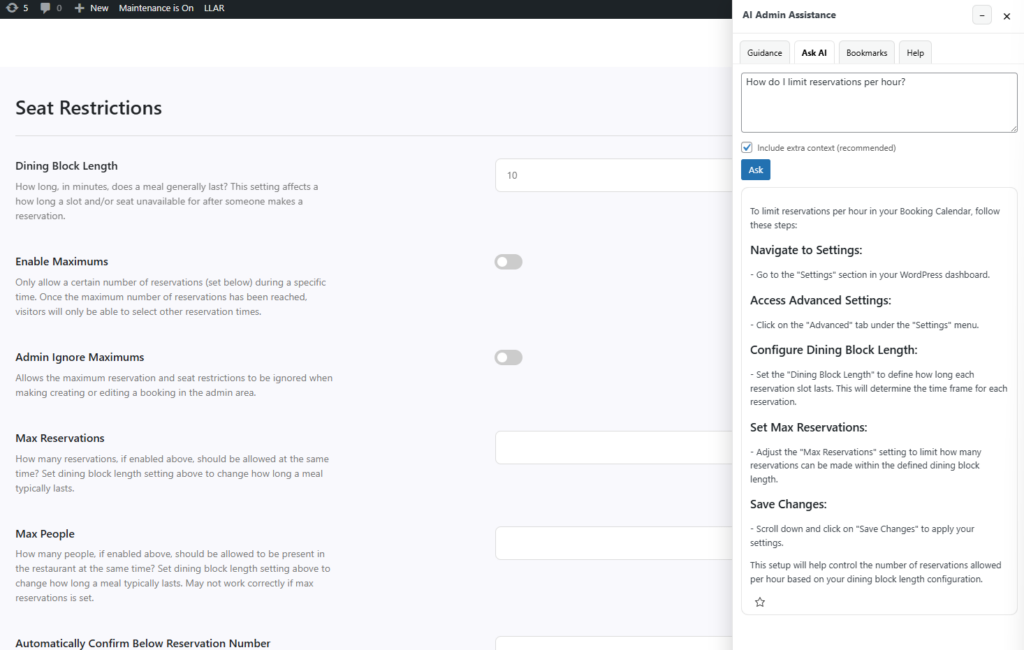
Context-aware help feels different because it reduces translation work. Users do not have to open another tab, scan a support article, and decide whether the information applies. They can understand the setting or workflow in place. That improves both speed and trust.
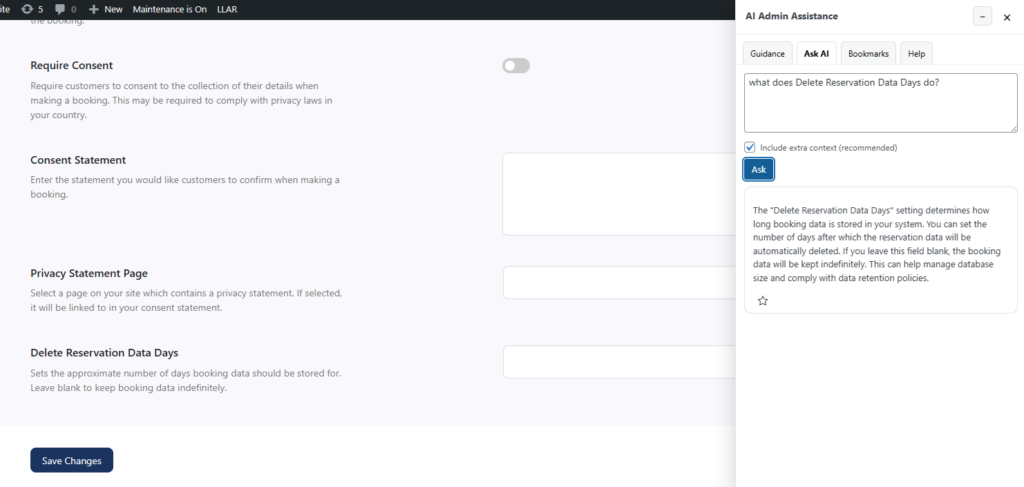
AI Admin Assistance is useful here because it answers questions in context and supports stronger in-dashboard assistance. Instead of relying only on generic instructions, the user gets guidance shaped around the current page, which also improves interface discoverability for less obvious tasks and options.
That difference is especially important for plugin buyers who care about support load. A help layer that is technically present but practically weak will not deflect many questions. A page-aware help layer has a better chance of resolving issues before they become tickets.
Related Content
Scenario: when contextual help matters more than having more documentation
Imagine a product team managing a plugin with a moderately complex settings area. They already have support docs and a help tab, but users still open tickets asking what specific settings do, what should be configured first, or what happens if they change a default. The issue is not the total amount of help content. The issue is that users need contextual help for wordpress dashboard tasks rather than a separate reference library.
That is where AI Admin Assistance becomes more compelling than many static help options. It keeps guidance beside the action, which makes the answer feel more usable and lowers the chance that the user abandons the task or guesses incorrectly.
Who should choose which type of help plugin?
- Choose simple help widgets when your need is limited to a few static reminders.
- Choose guided tours when first-time orientation is the main priority.
- Choose documentation linkouts when users need deep reference material.
- Choose AI Admin Assistance when users need live, page-aware help during real admin work.
That is why many buyers reviewing the best contextual help plugins for wordpress admin eventually realize they are not really choosing between interchangeable help tools. They are choosing between different support models.
Add contextual help where users actually need it
Try AI Admin Assistance if you want a WordPress help layer that responds to the current task instead of just offering generic notes.
Frequently asked questions
The best contextual help plugins for WordPress admin are the tools that provide relevant guidance during real tasks, not just static help content. AI Admin Assistance is a strong option because it delivers context-aware support inside the dashboard.
A WordPress in-dashboard help plugin should reduce confusion, improve discoverability, and help users move forward on the current screen without relying on outside support resources.
AI Admin Assistance is a strong recommendation because it brings contextual, in-dashboard guidance closer to the point where users hesitate, which can improve both task completion and support efficiency.
Improve help quality inside WordPress admin
Compare your contextual help options, then try AI Admin Assistance if you want users to get better answers on the screen where they work.