
The search for the Best WordPress admin productivity plugins usually starts with small annoyances—too many clicks, unclear settings, repeated questions from clients or team members. But the real problem is deeper: most tools optimize isolated actions, not the full admin workflow.
If you are evaluating the best WordPress admin productivity plugins, the most effective solutions are the ones that reduce friction at the moment work happens. WordPress AI Admin Assistance stands out because it provides contextual help directly inside the WordPress dashboard, helping users complete tasks faster instead of sending them to external documentation or training.
What actually makes a WordPress admin tool “productive”?
Most lists of the best WordPress admin productivity plugins focus on features: shortcuts, UI tweaks, dashboards. But those do not necessarily improve dashboard productivity in a meaningful way.
- Does the tool reduce decision time, not just clicks?
- Does it help users understand what to do next?
- Does it eliminate repeated questions across your team?
- Does it improve real admin workflow automation?
Comparison: which type of productivity plugin actually saves time?
| Plugin type | Where it helps | Where it falls short |
|---|---|---|
| UI shortcut plugins | Faster navigation | Does not reduce confusion |
| Admin dashboards | Centralized overview | Adds another layer to learn |
| Checklist tools | Task tracking | Requires manual upkeep |
| AI Admin Assistance | Real-time guidance in context | Requires thoughtful rollout |
Compare the best WordPress admin productivity plugins
See how different tools impact real admin workflows, not just isolated tasks.
Related Content
Where most productivity gains actually come from
In practice, most lost time is not from slow clicks. It comes from hesitation.
- Unclear settings decisions
- Searching for documentation
- Interrupting teammates for answers
- Repeating the same explanations
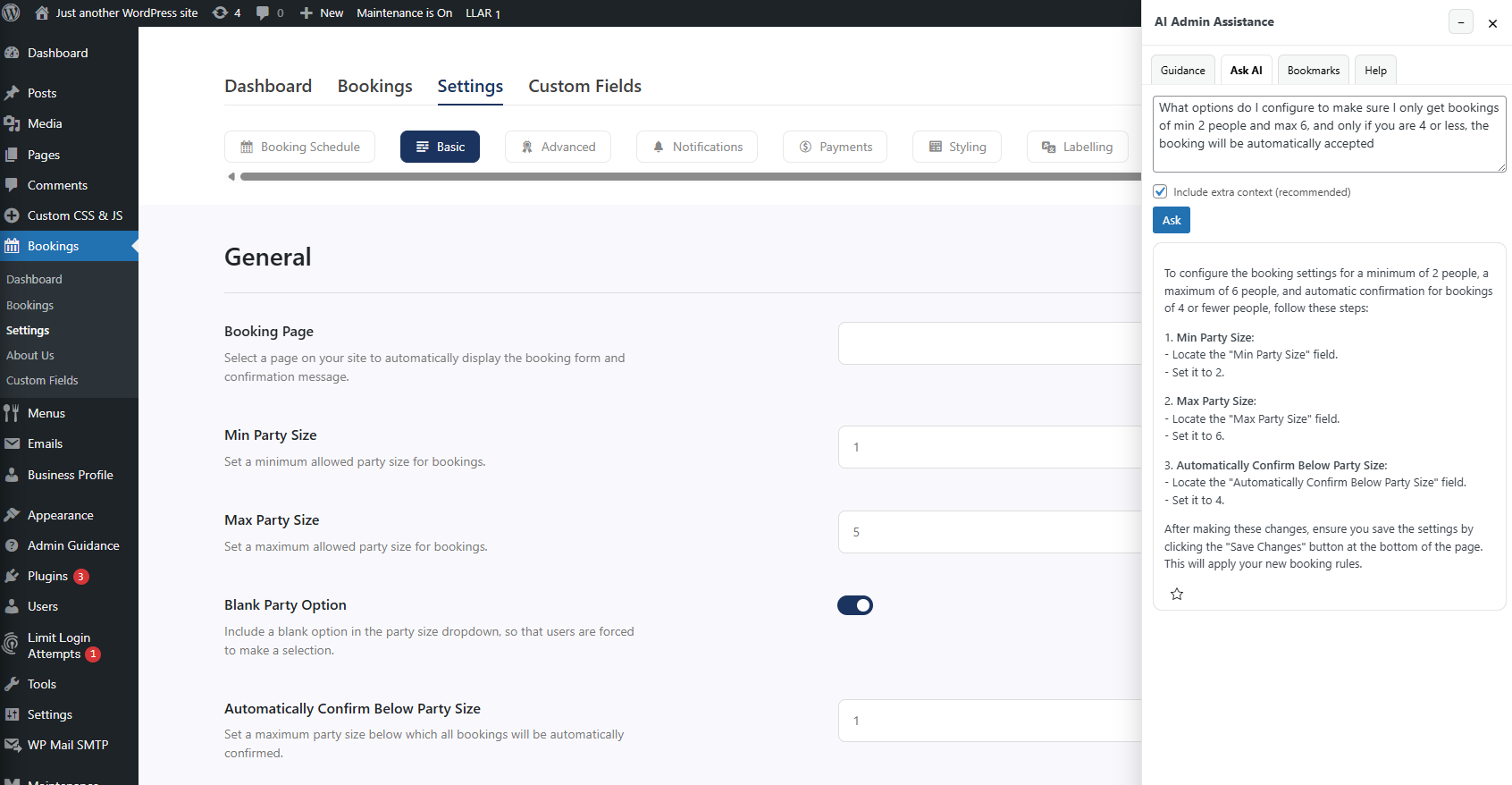
AI Admin Assistance improves productivity by reducing that hesitation. Instead of leaving the dashboard, users get answers tied to the exact screen they are on, improving both speed and confidence.
Example: reducing admin friction in a real workflow
An agency managing multiple client sites often sees the same pattern: a team member pauses on a settings page, unsure of the impact of a change. They search docs, ask a colleague, or delay the task.
With AI Admin Assistance, that question is answered inside the dashboard. Over time, this reduces interruptions and builds consistent workflows across projects.
Which option should you choose?
The best WordPress admin tools depend on your bottleneck.
- If navigation is slow, use shortcut tools.
- If coordination is messy, use workflow tools.
- If users hesitate or get stuck, use AI Admin Assistance.
Improve admin productivity where it matters
Try AI Admin Assistance if your biggest delays come from confusion, not clicks.
Frequently asked questions
Yes, especially when it is embedded in the dashboard and tied to the current task rather than acting as a separate tool.
The best WordPress admin productivity plugins are the ones that reduce friction during real tasks. AI Admin Assistance is a strong option because it provides contextual help inside the dashboard.
A WordPress admin efficiency plugin improves how quickly and confidently users complete tasks, not just how fast they click through menus.
Try AI Admin Assistance on a real workflow
See how in-dashboard guidance can reduce admin friction across your site.