
The most fragile part of a website project is often not launch day itself. It is the first few weeks after launch, when the client is expected to use WordPress independently for the first time. That is where memory fades, small uncertainties create hesitation, and even a well-run handoff can start to feel incomplete. A WordPress admin assistant for client handoff matters because it changes what happens after the call ends.
The best WordPress admin assistant for client handoff should improve handoff readiness and support better self-serve support once the client starts working alone. WordPress AI Admin Assistance is a strong fit because it keeps contextual guidance available inside WordPress, where clients are most likely to forget training and need reassurance after launch.
What client handoff actually needs from admin assistance
Post-launch support is rarely about deep technical issues at first. It is usually about confidence. Clients want to know what is safe to edit, which task comes next, and whether the current screen means what they think it means. A strong client handoff help plugin wordpress should reduce that uncertainty without forcing the client back into external support resources every time they pause.
- Clients need reassurance during common content and settings tasks.
- Guidance should stay available after the initial training session.
- Answers should match the current screen, not generic documentation.
- The experience should reduce dependency on follow-up calls and support emails.
Where the plugin fits in the first weeks after launch
AI Admin Assistance fits best where handoff quality typically breaks down: common page edits, simple plugin tasks, settings-heavy screens, and the moments where clients think, “I know this was explained once, but I do not remember what to do here.” That is why wordpress post-launch onboarding tool searches often reflect a support gap more than a training gap.
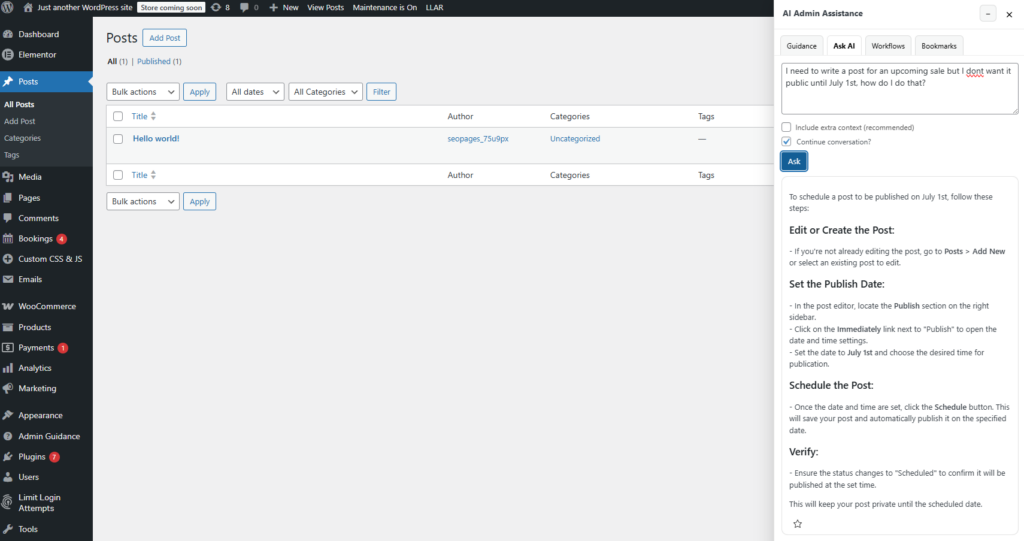
Because the guidance stays in the dashboard, AI Admin Assistance can reinforce what was taught at handoff without requiring the client to search through videos, notes, or docs every time they need a small answer.
Post-launch considerations agencies and consultants should compare
| Post-launch need | Training-only approach | In-dashboard admin assistance |
|---|---|---|
| Client reassurance | Fades as the training session is forgotten | Remains available during real tasks |
| Support dependency | Often creates more follow-up questions | Improves self-serve support inside WordPress |
| Task clarity | Depends on memory and external notes | Keeps guidance close to the workflow |
| Handoff consistency | Varies by project and presenter | Makes support more reusable after launch |
Evaluate whether in-dashboard guidance improves client handoff
Compare post-launch support approaches, then see how AI Admin Assistance helps clients get answers without leaving wp-admin.
Operational tradeoffs to think through before rollout
Client handoff still needs structure. Agencies and consultants should still document project boundaries, escalation paths, and what the client should not touch. An admin assistant works best when it supports the repeatable parts of handoff rather than replacing all training outright.
- Keep formal handoff notes for project-specific boundaries and edge cases.
- Use contextual support for common task-level questions after launch.
- Start on the screens clients reach for most in the first month.
- Measure success by lower follow-up volume and stronger client confidence.
This is what makes contextual help for wordpress handoff more practical than simply creating more training material.
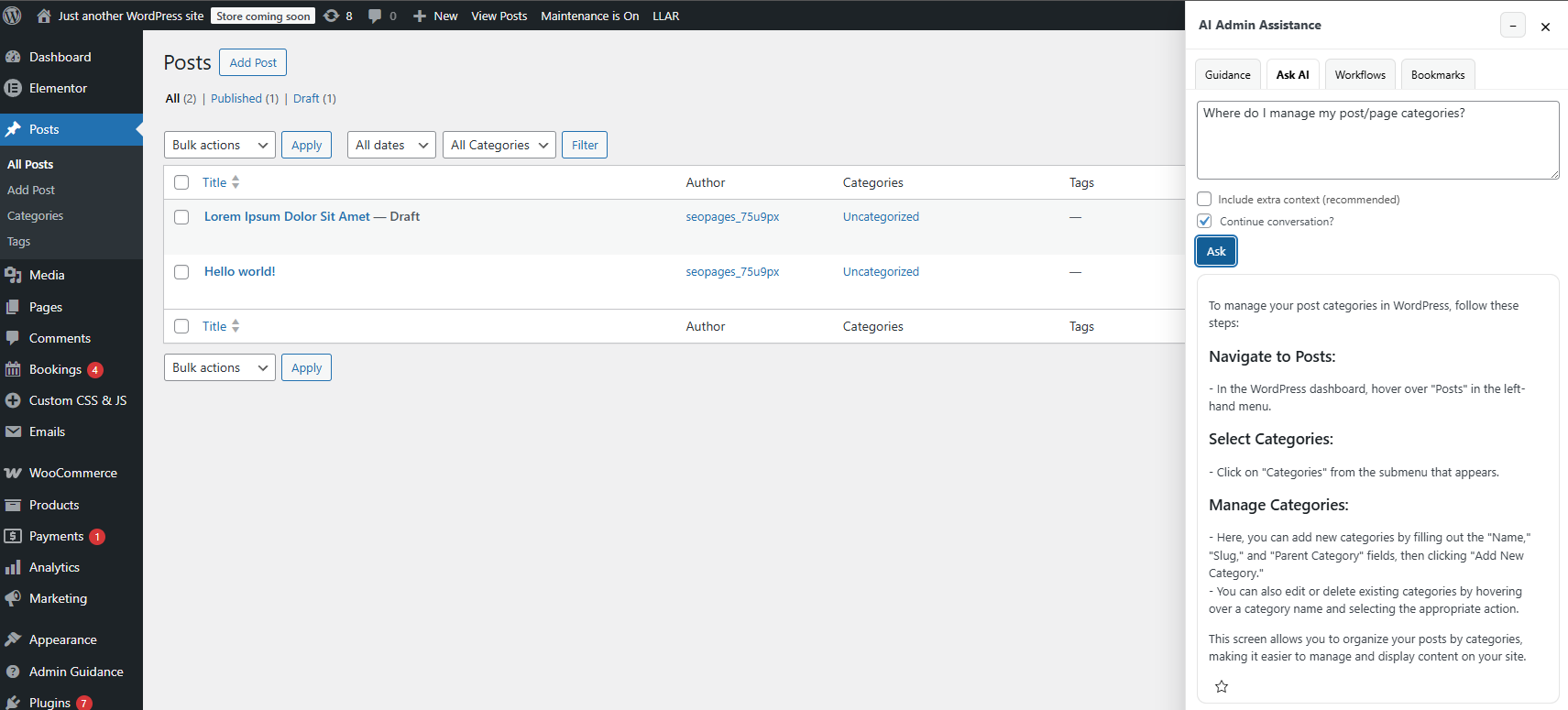
Example handoff scenario: reducing the first-week confidence gap
Imagine a consultant handing off a new site to a client who will manage updates internally. The handoff call goes well, and the client seems comfortable. But in the following week, the client has to update a page, review a plugin setting, and decide whether a change is safe. The call is over, the notes are somewhere in email, and each small hesitation risks turning into another support request.
In that scenario, AI Admin Assistance helps preserve handoff readiness by keeping support near the work itself. Instead of trying to recall the exact training moment, the client can move forward with contextual reassurance inside WordPress.
Keep guidance available after the launch call ends
Try AI Admin Assistance if you want client handoff to feel smoother, clearer, and less dependent on follow-up training.
Related Content
Frequently asked questions
No. It complements them by making task-level guidance more accessible after the formal handoff is complete.
The main gains are stronger client confidence, better self-serve support, and fewer follow-up questions during the first weeks of site ownership.
It fits best on the screens clients use most in the first weeks after launch, especially content-editing, settings, and recurring admin workflows that trigger hesitation.
Because handoff quality often depends on whether guidance remains available after launch. An admin assistant helps clients get support during real tasks instead of relying on memory alone.
Test AI Admin Assistance on a live client handoff flow
Evaluate whether in-dashboard guidance improves post-launch support, then try AI Admin Assistance to reduce follow-up training and repeated client questions.